Adding a Backup Phone Number
All roles
A backup phone is a plain contact field — useful for reaching you a second way — separate from your primary sign-in phone number. It only appears once you have a primary phone on file.
Note.Unlike your primary phone, a backup phone doesn’t need to be re-verified with a code — it’s a plain contact field, not a sign-in credential.
-
1
Open Settings
Scroll to the Contact Info card.
-
2
Tap "Add backup phone"
This link appears below your primary contact info once you have a primary phone set.
-
3
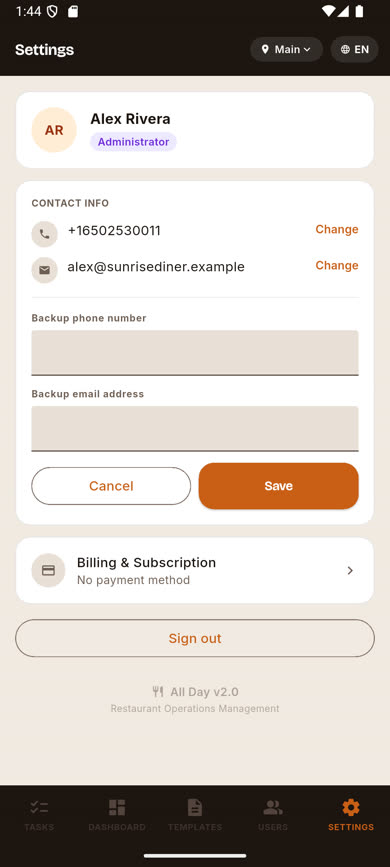
Enter the number and save
Type the backup number and tap Save.
-
4
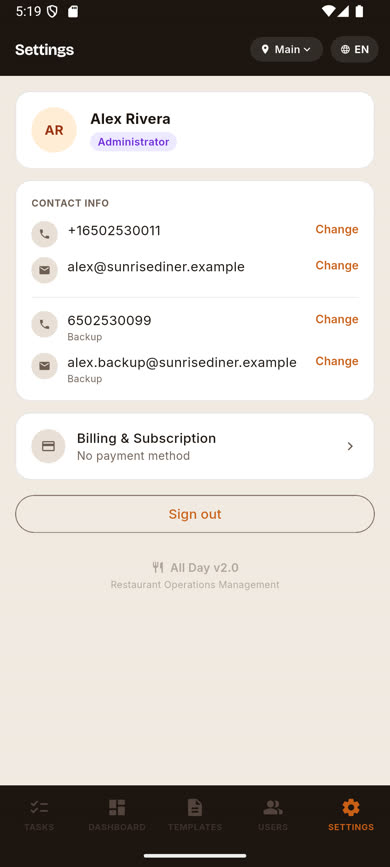
It appears in your contact info
The backup number is now listed with a "Backup" tag, with its own Change link.
Was this article helpful?