Creating a Task from a Template
ManagerAdministrator
Instead of typing a task out every time, Managers and Administrators can start from a saved template and just pick who it’s assigned to.
-
1
Open Create Task
Tap the + button on the Tasks screen, the same way as creating a custom task.
-
2
Pick a template
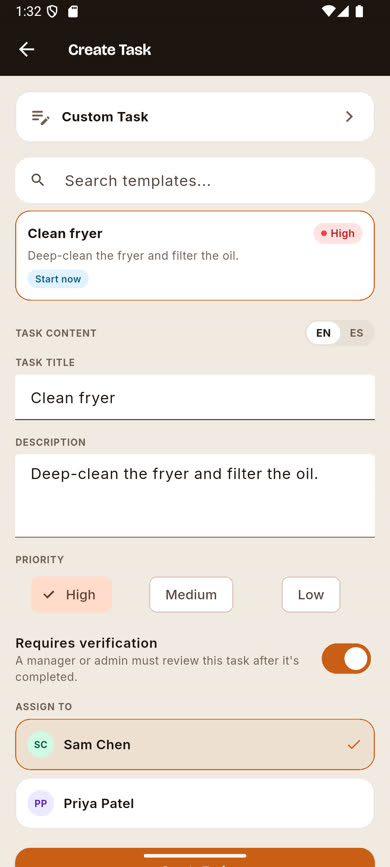
Above the Custom Task tile, search or scroll the list of available templates and tap one. Its title, description, priority, and verification setting are all pre-filled from the template.
-
3
Adjust anything you need to
You can still edit the pre-filled title, description, priority, or verification toggle for this one task — it won’t change the template itself.
-
4
Assign and create
Pick the crew member this instance goes to and tap Create Task.
Was this article helpful?